AI Coding Tools Compared: Claude Code, Cursor, Copilot, Codex & Antigravity (2026)
The Blackdeep Technologies engineering team benchmarked Claude Code, Cursor, Copilot, Codex, and Antigravity on identical prompts. The same Opus 4.6 model produced 2.8x different token costs and wildly different output — proving the tool matters as much as the model.

At Blackdeep Technologies — an AI-first product studio — we invest heavily in staying ahead of the curve on AI tooling. One of the ways our experts do that is through regular internal knowledge sharing sessions: structured meetings where our engineers, AI architects, and product builders research, test, and debate the tools and techniques shaping our industry. We then publish the best of those findings here, so the broader community can benefit from our process.
This post is based on one of those sessions. Our engineering team ran a live benchmark comparing five leading AI coding tools — Claude Code, Cursor, GitHub Copilot, OpenAI Codex, and Antigravity — using the same prompt, the same conditions, and a structured scoring framework built around the criteria that matter most to our clients: speed, output quality, architecture, and cost.
Key Takeaways
- The same Opus 4.6 model produced wildly different output across three tools — the tool environment matters as much as the model.
- Claude Code used 2.8x fewer tokens than Cursor for the same task on the same model (12.6K vs 35.4K).
- Antigravity scored 25/25 with browser-verified CRUD, RFC-compliant validation, and the richest frontend from a three-line prompt.
- All five tools produced working code on the first try with zero human intervention.
Why the Tool Matters as Much as the Model
At Blackdeep Technologies, evaluating AI coding tools isn’t academic — it directly informs how we staff projects, structure our AI-assisted development process, and advise the startups and enterprise teams we partner with. AI coding assistants have reached critical mass, and the question is no longer whether to use one — it’s which one fits your workflow.
More specifically: does it matter which tool you pick if they’re all running the same underlying model?
Our experts ran this benchmark to find out. Not with a synthetic test, but with a real task: one prompt, five tools, zero hand-holding. Three of the five tools — Claude Code, Cursor, and Antigravity — all ran Opus 4.6. Any differences in their output would point squarely at the tool environment, not model capability.
The answer turned out to be a strong yes — and the gap was larger than we expected.
The 5 AI Coding Tools We Benchmarked
Our team selected five tools that represent the main categories in the market: terminal agents, IDE-native assistants, and cloud-based agents. The selection reflects what Blackdeep Technologies engineers actually evaluate when choosing tooling for AI product development — not just hype, but tools with meaningful adoption and differentiated approaches.
| Tool | Model | Time (both prompts) |
|---|---|---|
| Claude Code | Opus 4.6 | ~2 min |
| Cursor | Opus 4.6 | ~4-5 min total |
| Copilot (VSCode) | Raptor mini | ~2-3 min total |
| Codex | GPT-5.4 | ~4m 54s total |
| Antigravity | Opus 4.6 | ~7 min total |
The Prompts We Used
We kept both prompts intentionally minimal — no framework preferences, no architecture hints, no styling requests. The simplicity is the point: it reveals how much each tool infers on its own.
Prompt 1:
Create a simple web app with a REST API and a frontend.
It should have full CRUD for a Users entity with fields: id, name, email, role.
The frontend should show a table with all users and a form to add/edit/delete them.
Prompt 2 (sent after each tool completed the first):
Refactor the API to use a service layer and add basic input validation for email format.Two prompts. No follow-ups, no clarifications. Would three lines of text be enough for a tool to infer the right stack, the right structure, and even the right visual design?
How Each Tool Approached the Task
None of the five tools stopped to ask a single clarifying question. All five inspected the workspace and went straight to generating code. The differences were in how they worked — and these differences matter a great deal in production settings. At Blackdeep Technologies, our AI development process emphasises agent autonomy: we want tools that can reason about a problem, take initiative, and verify their own output rather than waiting for human prompting at every step.
- Claude Code asked for write permission on each file, then autonomously ran
npm install, started the server, and curl-tested every endpoint before handing off. Total hands-on time: near zero. - Cursor generated the full app in a single pass and surprised us with a dark, editorial UI using DM Serif Display and Outfit fonts, plus toast notifications — all unprompted.
- Copilot narrated each step before acting, the most transparent workflow of the five.
- Codex decomposed the task into four internal subtasks and asked about environment permissions (server bind address), not requirements.
- Antigravity went the furthest: after code generation, it opened a browser autonomously, performed a full CRUD flow, and analyzed screenshots to verify the output worked.
The difference between “generate code” and “generate, run, test, and verify code” is the gap that separates a suggestion engine from an actual coding agent. Antigravity and Claude Code both crossed that line. Cursor and Copilot stayed on the suggestion side.
Tech stack chosen by each tool
| Tool | Backend | Frontend | Storage | Notable Choice |
|---|---|---|---|---|
| Claude Code | Express | Vanilla JS, separate public/index.html | In-memory | System fonts, clean CSS |
| Cursor | Express | Single HTML with inline CSS/JS | In-memory | Custom Google Fonts, toast notifications |
| Copilot | Express + CORS | 3 separate files (html/css/js) | In-memory | Only tool that added CORS middleware |
| Codex | Raw Node http | 3 separate files | File-backed (users.json) | Zero npm dependencies |
| Antigravity | Express + uuid | 3 separate files | In-memory | UUID-based IDs |
Did the code work on the first try?
Yes, across the board. All five tools produced working code from the first prompt with zero additional interventions.
How Each Tool Handled the Refactor
The second prompt — add a service layer and email validation — is where the architectural differences became most visible. Understanding existing code before changing it is harder than generating from scratch.
Claude Code extracted all business logic into a clean userService.js with email regex, role enum checking (Admin/Editor/Viewer), and an errors array pattern. Multiple validation failures returned together in a single response. The server became a thin routing layer.
Cursor produced the most layered architecture: three separate files — userService.js for data and logic, validation.js for input checks (email regex + role whitelist), and a slim server.js routing layer. The cleanest separation of concerns we’ve seen from a single prompt.
Copilot kept validation inside the service (no separate validator), used a single string error pattern, but added role enum checking alongside email regex.
Codex introduced ServiceError extends Error with status codes, plus a normalizeUserInput() helper. Role stayed free-text, but data sanitization was thorough.
Antigravity went the deepest: RFC 5321 compliance, max 254-character email length, name/email length limits, type checks, role whitelist, duplicate detection with 409, and 7 automated test cases to verify. The most thorough validation by far.
The most telling finding: three tools running the same Opus 4.6 model produced three completely different refactoring architectures. Claude Code chose a single service file, Cursor split into three files, Antigravity added automated testing on top. The model didn’t determine the architecture. The tool did.
This is a pattern our experts observe repeatedly in client engagements at Blackdeep Technologies: teams that invest in selecting the right AI toolchain — not just the right model — consistently ship faster and with fewer regressions.
What Each Tool Actually Built (Screenshots)
Claude Code (Opus 4.6)
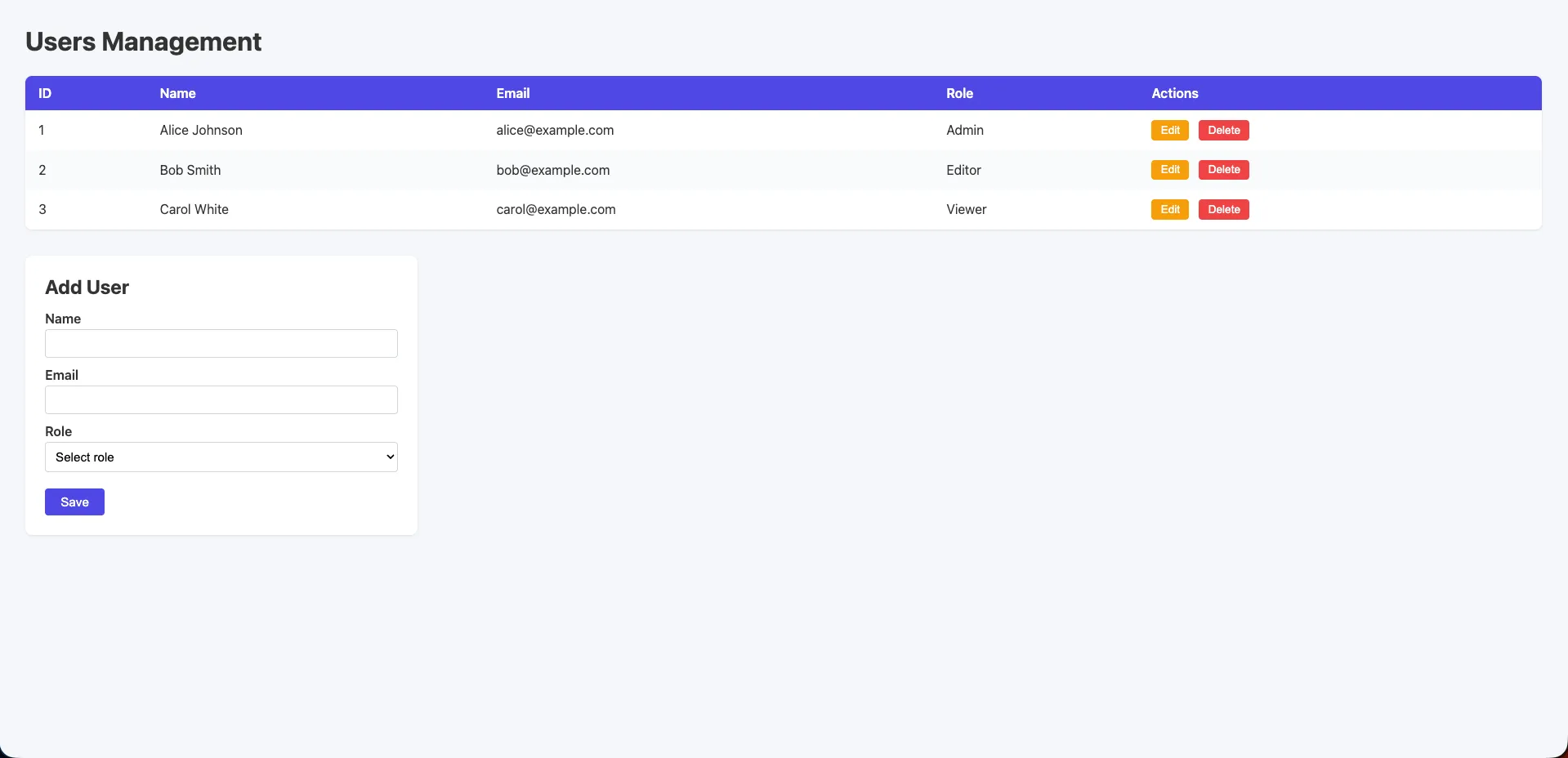
Functional and clean. A “Users CRUD” heading with a styled HTML table, system fonts, soft grey background, colored Edit and Delete buttons, and an Add User form with role dropdown. Separate public/index.html with proper CSS. More polished than a raw default, but still minimal compared to the other tools.
Cursor (Opus 4.6)
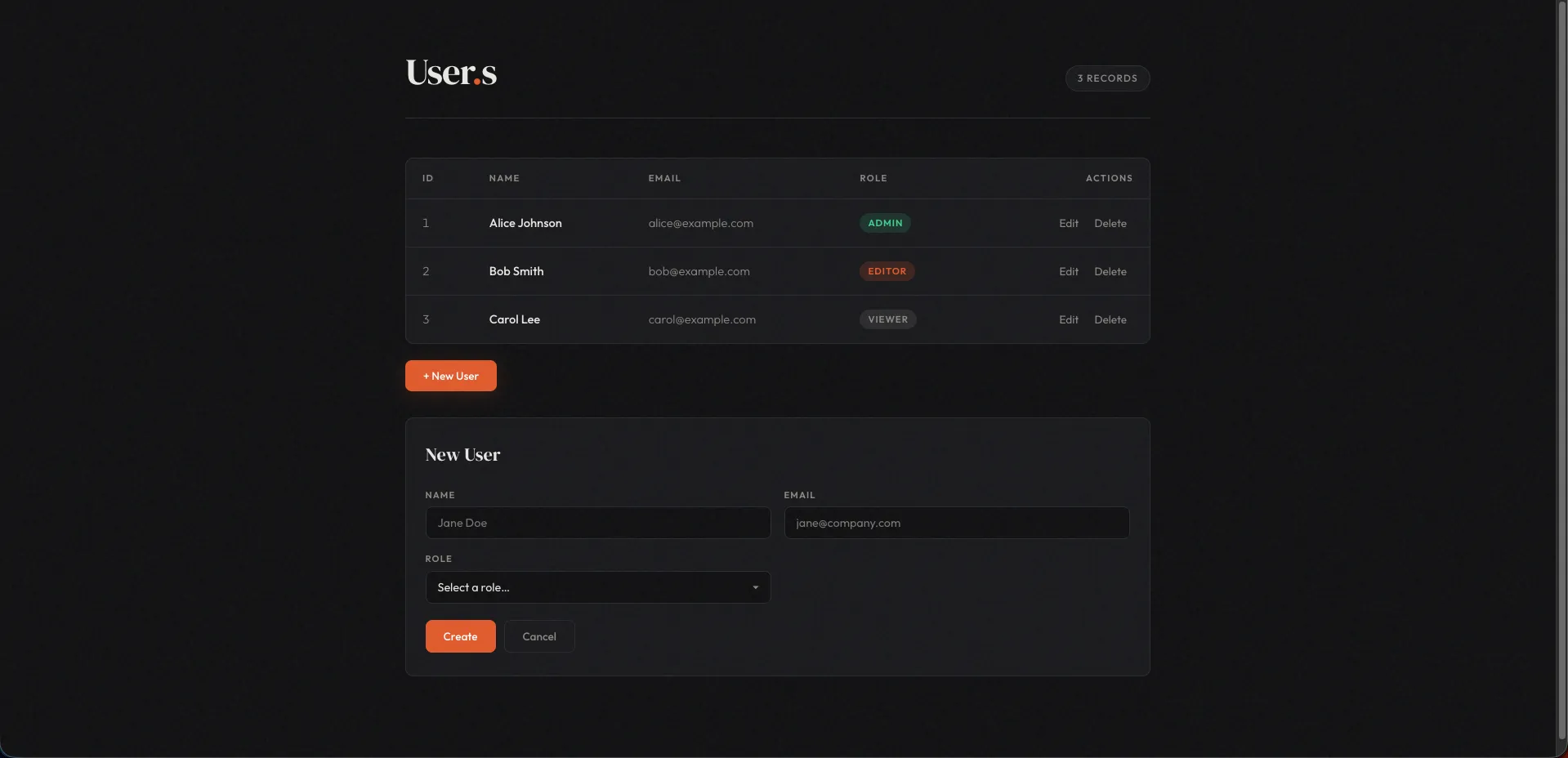
A polished dark-themed UI with editorial flair. DM Serif Display for headings, Outfit for body text, custom Google Fonts loaded unprompted. Users table with styled role tags, inline edit/delete actions, and toast notifications on every CRUD operation. A cohesive design language that goes well beyond what was asked for.
Copilot (Raptor mini)
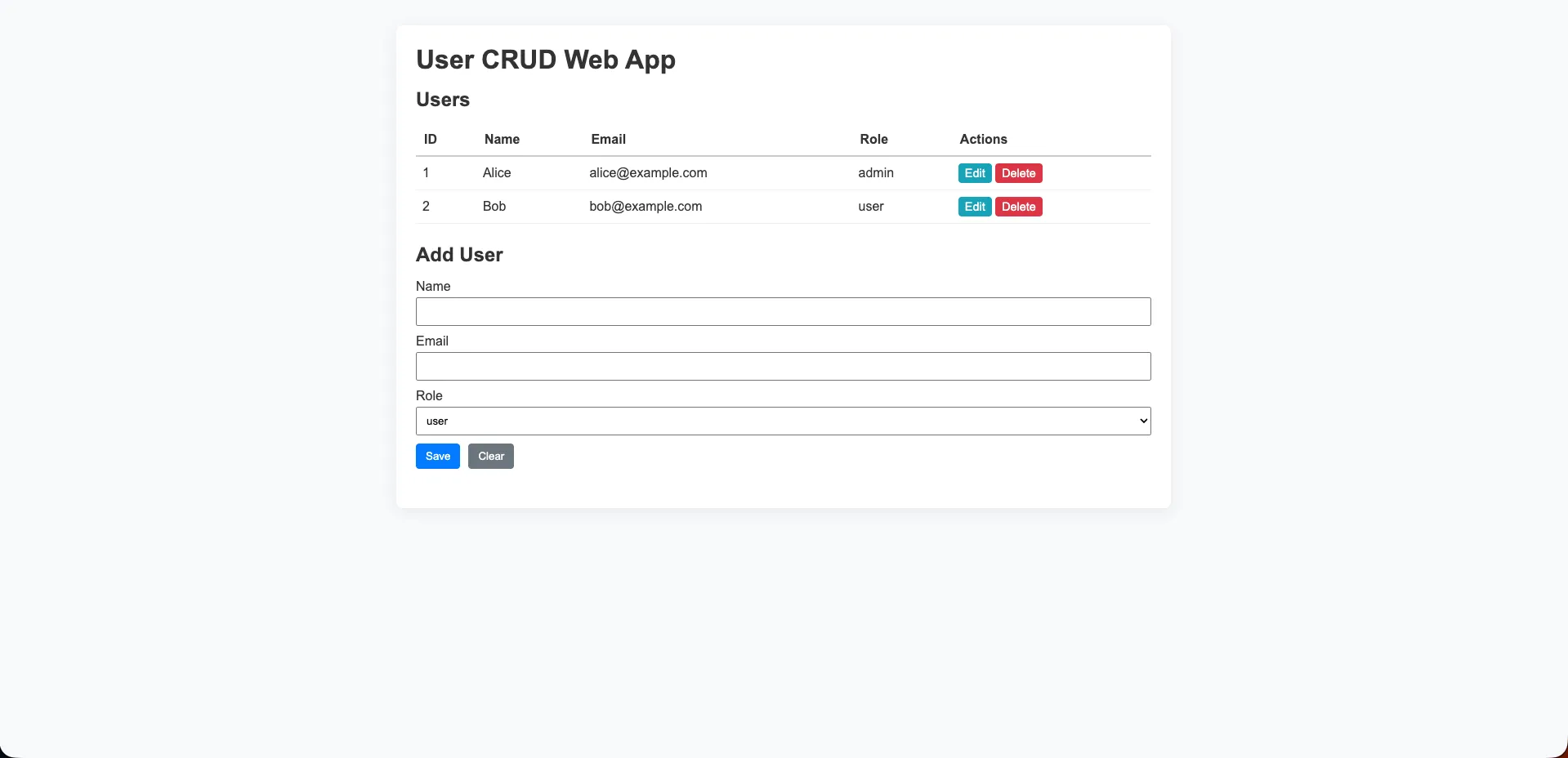
A standard light-grey layout with a purple/blue header row on the table. Edit and Delete buttons in yellow and red. A straightforward “Add User” form with a role dropdown below. Clean and functional: what you’d expect from a capable but lightweight model.
Codex (GPT-5.4)
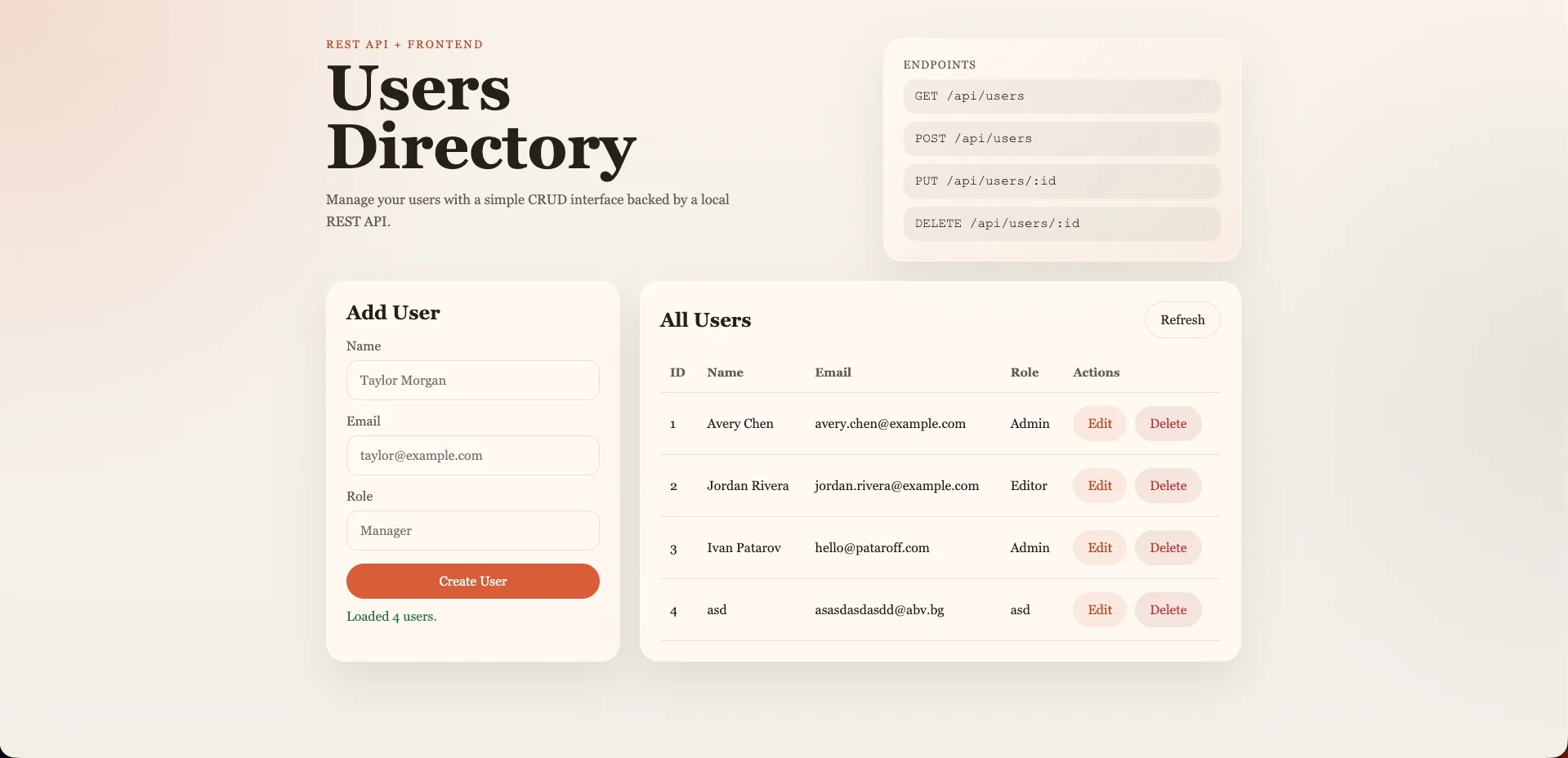
The visual standout. Warm-toned design with Georgia serif typography, an “Endpoints” reference panel listing all API routes, glassmorphism card styling, and a two-column layout. Radial gradient background. Completely unprompted. The most visually distinctive UI of the benchmark.
Antigravity (Opus 4.6)
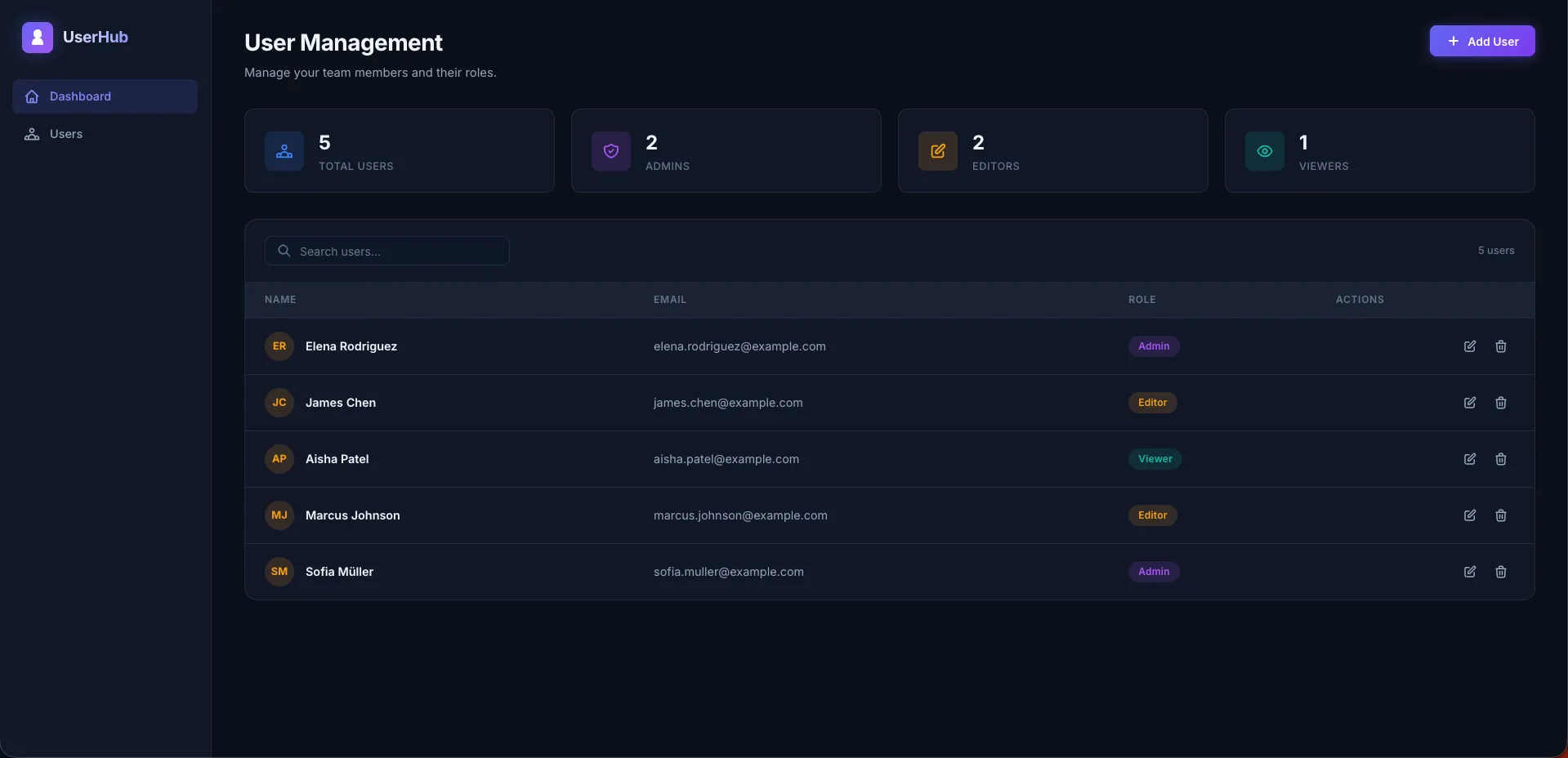
A full dashboard application. Dark sidebar with “UserHub” branding and navigation links. Four stats cards showing Total Users, Admins, Editors, and Viewers with live counts. A searchable user table with avatar initials (color-hashed per user), role badges, and edit/delete action icons. From a three-line prompt, this is the most complete frontend any tool produced.
Token Cost: Claude Code Used 2.8x Fewer Tokens Than Cursor
We measured token consumption across the three tools running Opus 4.6.
| Tool | Model | Tokens Used |
|---|---|---|
| Claude Code | Opus 4.6 | 12.6K |
| Cursor | Opus 4.6 | 35.4K |
| Antigravity | Opus 4.6 | Not available (no token reporting in UI) |
Cursor consumed nearly 2.8x the tokens of Claude Code for the same task on the same model. At API pricing, that gap translates directly to cost. For a team running dozens of prompts per day, a 2.8x multiplier compounds fast.
Does the extra spend improve the output? Cursor’s editorial UI was more polished, but the core functionality was identical. Whether that richer frontend justifies triple the token cost depends on your priorities.
Antigravity’s lack of token reporting is itself a finding. If cost visibility matters to your org, not being able to see token usage is a real limitation.
Benchmark Scores
We scored each tool across five dimensions, each out of 5: context awareness, UX/ease of use, code quality and architecture, edge case handling, and unique features value.
| Metric (each /5) | Claude Code | Cursor | Copilot | Codex | Antigravity |
|---|---|---|---|---|---|
| Context awareness | 5 | 4 | 4 | 5 | 5 |
| UX / Ease of use | 3 | 4 | 3 | 4 | 5 |
| Code quality / architecture | 4 | 3 | 3 | 5 | 5 |
| Edge case handling | 4 | 3 | 3 | 5 | 5 |
| Unique features value | 4 | 3 | 3 | 4 | 5 |
| Total | 20/25 | 17/25 | 16/25 | 24/25 | 25/25 |
Key Findings
Codex thought about the problem, not just the solution. Zero npm dependencies, file-backed persistence that survives restarts, a 1MB body size limit, path traversal protection, XSS sanitization, and aria-live on status messages — all from a three-line prompt. The most security-conscious output of the benchmark.
Antigravity was overkill for the prompt, and that’s a compliment. Browser-verified CRUD, RFC-validated email, UUID IDs, and the most feature-rich frontend by a wide margin. If Opus 4.6 is your model, Antigravity unlocks its full potential.
Claude Code was the fastest (~2 min) and most token-efficient (12.6K). Clean service layer with proper validation error arrays. But the same Opus 4.6 model produced dramatically more in Antigravity — the terminal context constrained what was expressed.
Cursor surprised with its editorial UI: custom fonts, toast notifications, and the cleanest three-layer refactor architecture (service/validation/routes). But the 35.4K token cost versus Claude Code’s 12.6K is hard to ignore at scale.
Copilot punched above its weight. On a free-tier model (Raptor mini), it produced well-structured code with proactive architectural suggestions for next steps.

Where Each Tool Falls Short
- Claude Code: Permission prompts per file interrupt the flow. UI is modest compared to what the same model achieved in Antigravity or Cursor.
- Cursor: 35.4K tokens for the same task Claude Code did in 12.6K — nearly 3x the cost for comparable functionality.
- Copilot: Claude models unavailable on free tier. Role enum in frontend doesn’t match seed data. Single-error string pattern limits debuggability.
- Codex: Slower workflow (~4m 54s). Role is free-text with no enum validation on the backend.
- Antigravity: Slowest at ~7 min. UUID IDs break API comparability. No token usage reporting. More output than most teams need for a simple task.
Which AI Coding Tool Should You Use?
| Tool | Model | Score | Best For |
|---|---|---|---|
| Antigravity | Opus 4.6 | 25/25 | Feature completeness, autonomous QA, unlocking Opus 4.6’s full potential |
| Codex | GPT-5.4 | 24/25 | Production-quality output, security, zero-dependency builds |
| Claude Code | Opus 4.6 | 20/25 | Speed and token efficiency: fastest and cheapest per task |
| Cursor | Opus 4.6 | 17/25 | Polished UI output, clean refactor architecture, IDE integration |
| Copilot | Raptor mini | 16/25 | Best value on a free tier: proactive, well-structured, IDE-native |
Use Codex when output quality, security, and minimal dependencies matter most. Use Antigravity when you want the most complete output from Opus 4.6 and autonomous verification. Use Claude Code when iteration speed and token cost are the priority. Use Cursor when you want polished UI and clean architecture within an IDE workflow.
The tool you wrap around a model shapes what that model can express. Our benchmark shows the gap is larger than most teams expect — and the right choice depends entirely on what you’re optimizing for.
At Blackdeep Technologies, our AI architects help product teams make exactly these decisions — evaluating tooling against specific project constraints, team skill profiles, and cost envelopes. If your organisation is navigating the AI coding tools landscape, get in touch to discuss how we can support your process.
Watch the Knowledge Sharing Session
This article is drawn directly from a live internal knowledge sharing session hosted by the Blackdeep Technologies engineering team. In these sessions, our experts present original research, run live experiments, and debate findings as a group — the same process we bring to every AI product we build for our clients.
The recording below captures the full session: the live benchmark runs, the scoring discussion, and the team’s real-time analysis of each tool’s output. If you prefer to see the code being generated in real time rather than reading the summary above, this is the place to start.
Frequently Asked Questions
Does the same AI model produce different results in different tools?
Yes, significantly. In our benchmark, the same Opus 4.6 model produced a basic CRUD app in Claude Code, an editorial dark-themed UI in Cursor, and a full dashboard with sidebar navigation in Antigravity. The tool’s system prompts, agentic scaffolding, and context management shape output far more than model selection alone.
What’s the most token-efficient AI coding tool?
In our test, Claude Code used 12.6K tokens while Cursor used 35.4K for the same task on the same Opus 4.6 model — a 2.8x difference. Multiplied across a team running hundreds of daily prompts, that efficiency gap has real cost implications.
Which AI coding tool is best for beginners?
Copilot is the most accessible entry point. It works as an extension in any IDE, narrates its steps transparently, and has a generous free tier. Our benchmark scored it 16/25 overall, but its IDE-native workflow makes it ideal for developers who want AI assistance without changing their editor.
Should I choose a coding tool based on the model it uses?
Not exclusively. Our benchmark showed that the tool environment had at least as much impact as model capability. Codex on GPT-5.4 scored 24/25 with zero dependencies and built-in security, while Cursor on Opus 4.6 scored only 17/25. The right question isn’t “which model?” but “which tool gets the most out of the model for my workflow?”
Can AI coding tools produce secure code?
It depends on the tool. In our benchmark, Codex stood out with path traversal protection, XSS sanitization, and body size limits — all unprompted. Most tools didn’t add security measures unless explicitly asked. Always review AI-generated code for vulnerabilities before deploying to production.
Last updated: April 9, 2026.